
Sellerfuse is a fantastic tool for Amazon Sellers. In addition to showing sales and profit figures, they have a comprehensive repricer, a full 3PL solution for sellers who want to track their purchases and stock in hand. It’s the first 3PL system I’ve seen and it’s pretty good! To top things off, they have one of the best Amazon Ads suites that we have used in a while. You get a lot for your money, it’s essentially 5 tools in 1.
I’ve been using it now for over 6 months, and the time that it’s saved me is astonishing. If you’re looking for Amazon FBA Software as a Seller, you’ve found the perfect tool.
In this Sellerfuse review, I will be explaining everything that I’ve learnt from the platform in the 6 months I’ve now been using it. After being a member of both Sellerboard and SellerToolKit for 12+ months, I was a little hesitant to try a new one.
But I’m so glad that I did. For the record, I now subscribe to all 3, but I will soon be reducing my subscription outgoings and subscribing solely to Sellerfuse. I’m still a big fan of STK and SB too, but now I’ve found a tool that can do both of these tasks.
If you’re looking for an Amazon Sales Dashboard, which has great depth in Pay Per Click (Amazon Ads) and goes deeper into ASIN metrics and sales analysis, you need to give Sellerfuse a chance.

Product Verdict
- Figures are perfect
- Free Backdata upon Request
- The Best PPC Ads Analysis Dashboard
- More Data than other providers
- Regular Releases and Updates
- No Repricer yet (We are told it’s being released soon)
Price: £29.99 per month
What is Sellerfuse?
Sellerfuse is an application for Amazon Sellers, which helps them track their actual profitability on Amazon. This is the core reason for using Sellerfuse, but they have also expanded to make this application a data warehouse, which helps with All Things Amazon.
They provide information for all of your Pay Per Click needs, so you can see the real stats for your campaigns and products that you advertise. This is a game-changer for anyone that does ads, and they are the only Amazon tool that goes into this much depth. It’s a very good addition, considering the fact it’s included in the membership fee.
The core of Sellerfuse is the order tracking and dashboard, as ultimately, sellers such as yourself will want to see your actual profits. They provide this in a simple dashboard, which allows you to see all of your figures. The data is spot on, and also, I think it’s one of the better, more modern looking dashboards. Actually, I spoke with the owner on a support ticket, and he mentioned that he was not such a fan, and that they already have a re-design in mind.
Being an Amazon FBA or FBM seller is a data intensive process, so I do understand that all solutions providers face an issue in keeping a clean interface. As with all of the ones that I’ve tested, there are lots of numbers. What Sellerfuse does different, is show the sales in a clean graph format, helping you see highs and lows easily. In addition to this, you get a great way to see all of the metrics that matter to you, Reimbursements, Cost of Goods and Sourcing Spend to name a few.
You’ll see a lot more on the Sourcing section later, as what Sellerfuse really does different, is provide a way for you to actually track your purchases. This is a feature which really gets our gears moving, and turns Sellerfuse into an all in one application. When backed up with the PPC section & other handy features, it comes straight out of the box and punching with the big players in this space.
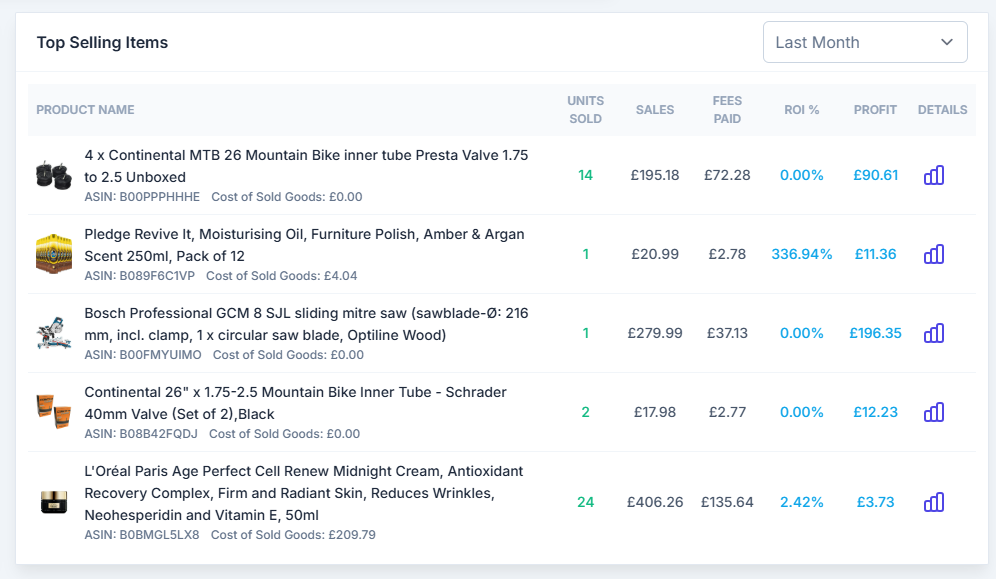
In the Dashboard, you’ll also see a large section which shows you the latest sale you’ve made. This is great, as giving you the time and date, lets you see when the last sale was, in addition to all of the financial information to partner it too.
Sellerfuse Helps Sellers Reclaiming Lost Money
The Amazon refunds and reimbursements process is not ideal, and it’s been slammed by lots of sellers. The issue? It seems wide-open for abuse. It’s absolutely fantastic for buyers, as means they’re always protected.
However, as a seller, it’s not good. It can destroy profit margins.
When you sell an item on Amazon, a customer has the right to request a refund. Amazon will take the money out of your account immediately, even though you haven’t received the item back yet. Obviously, this leaves a gaping hole in the process, because you can never be 100% sure that the item has been returned.
Thankfully, Sellerfuse comes with a reconciliation section, included in your membership fees. This is an absolute game changer, and something that can earn you back your membership fees alone.
There are services that charge up to £100 per month for this service, and others that charge you PER successful reimbursement. This can get very expensive, so I’d always advise you take up a free service, which does the exact same thing without charging you.
Let’s break Sellerfuse down now, to show each tool and explain a little bit what it does.
Amazon Sales Dashboard
Just like you’re used to seeing at SellerToolKit and Sellerboard, Sellerfuse has it’s own Sales / Profit dashboard. I’m a big fan of the interface, which seems much easier than others I’ve tried in the past. You get access to all of your data, and you can easily see the data that matters.
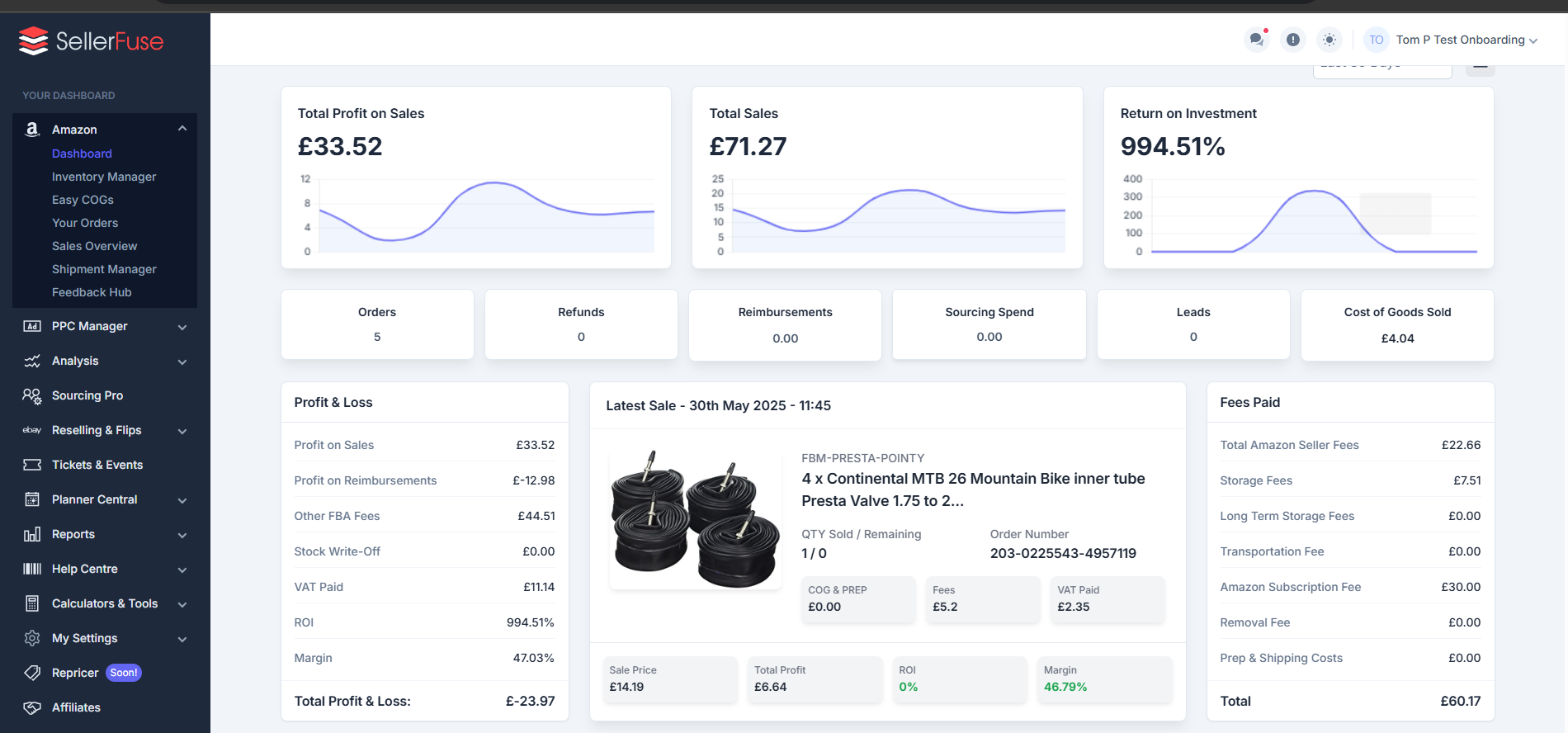
Alongside your Profit On Sales & Return on Investment, you can also see your Top Selling Items in the dashboard. This is really useful, as it helps you see your best performers really quickly.
To finish off the FBA Dashboard, Sellerfuse shows you a section of the Shipment Manager section, so you can see your latest shipments location and track them on the way into your Fulfilment Center.
You can also see all of your Inventory figures, and Sellerfuse splits this up by status, and shows you the profitability of your inventory. This will be really beneficial come end of year, when you need figures for your accountants.
Last but not least, you have the expenses section, where you can add membership costs, other software costs & then a breakdown showing your actual FBA fees.
I haven’t yet seen a Seller Tool Kit which does provide you with this data, so that’s definitely a first. I’m not too sure I’ll look at it much, but it is good to see what you’re being charged.
Your Amazon FBA Orders
This is probably the most important part of any seller application. As a seller, you’ll want access to a clean user interface, which is a good design & importantly shows you all of the information that you could possibly need for that order. That’s exactly what you get here.
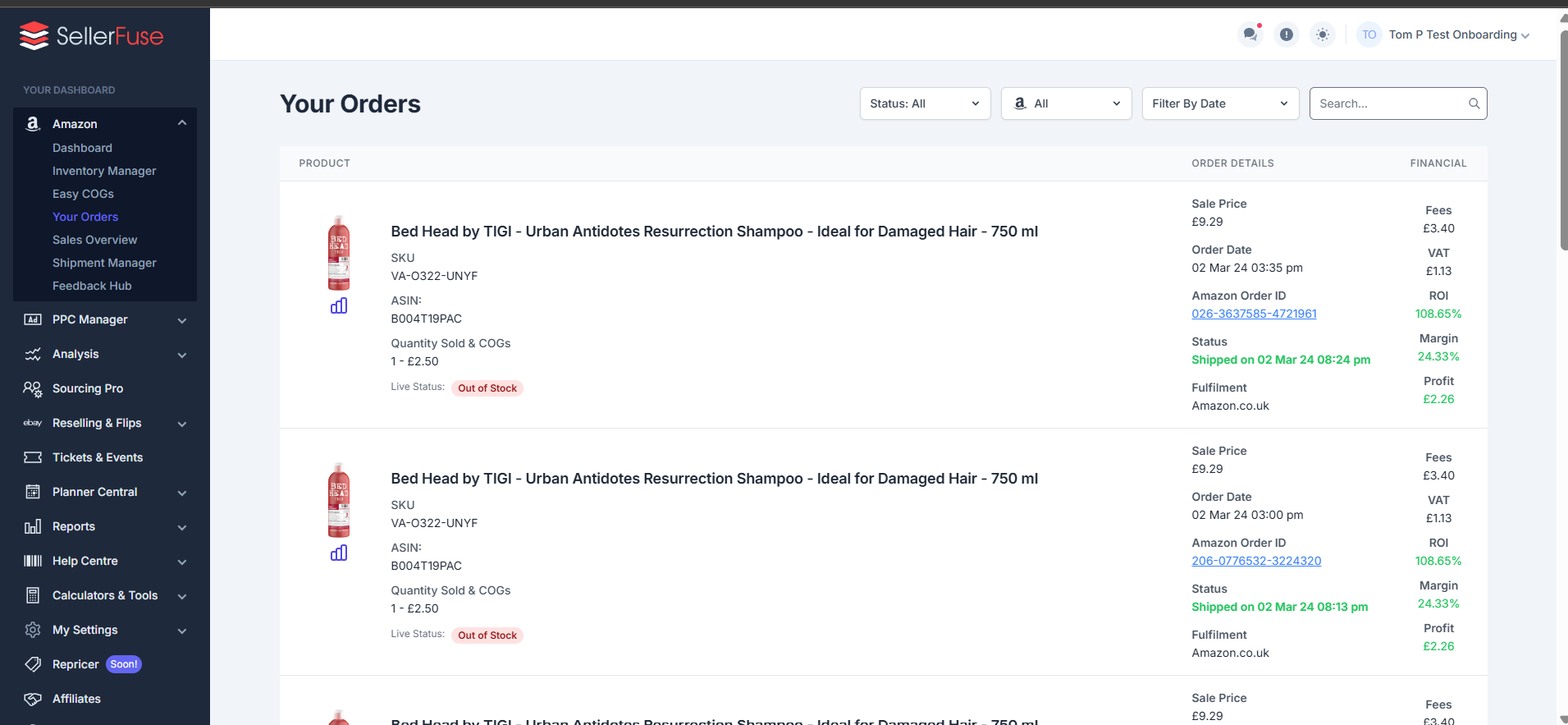
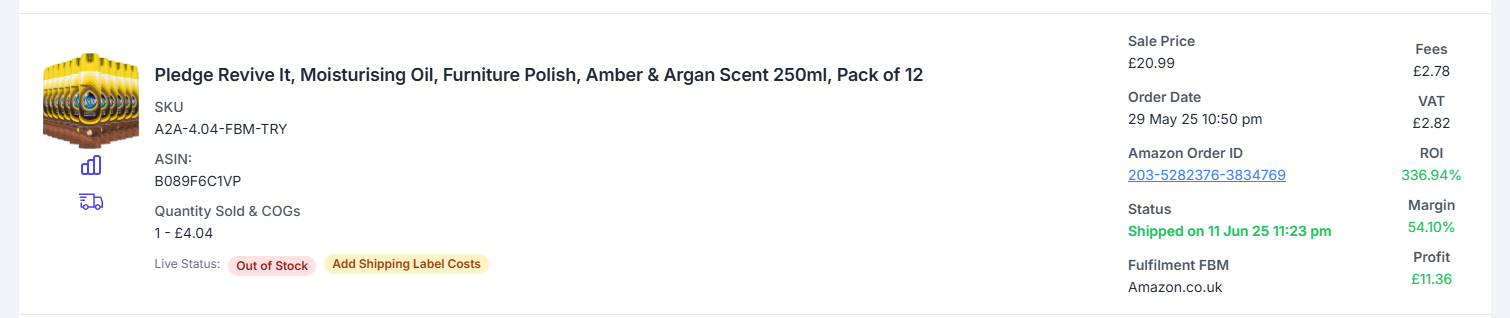
They offer a really easy to view design. It’s nothing special, but it offers you exactly what you need at a quick glance. Most people, me included, is only interested in the profit figure in the lower right. Profit!
The above is for an FBA Order, but Sellerfuse covers all types of orders, including FBM which is a requirement for Amazon sellers. FBM offers a way to sell something with reduced fees, where the seller is responsible for shipping and returns etc.
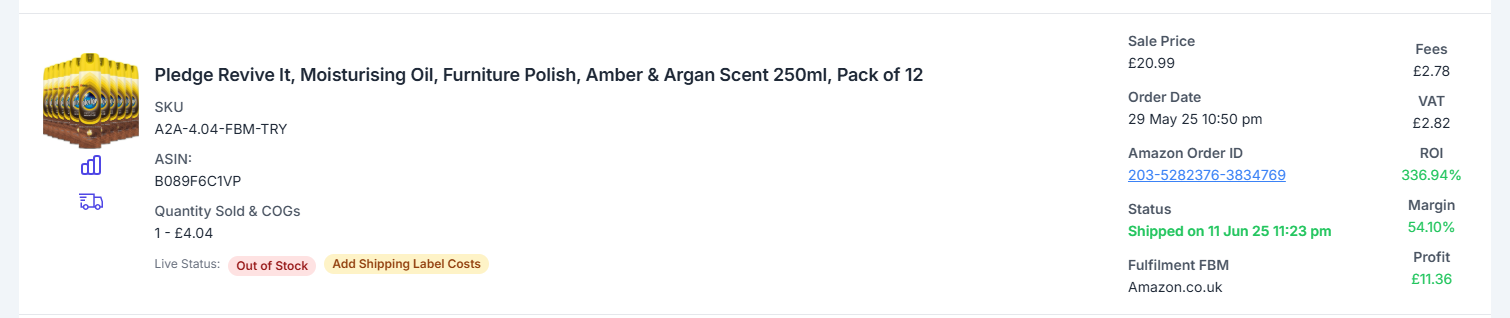
To make it easier for sellers to understand, Sellerfuse works on an icon based method here. When you sell an item via FBM, you can either purchase the shipping label on Amazon, or do it yourself.
If you do purchase the label through Amazon, then they will take care of the fees and include the shipping label into those costs. However, if you purchase the Shipping Label manually, you’ll see the reminder to add shipping label costs, alongside the Icon of the Truck. This is how you manually add this.
PPC & Amazon Ads Dashboard
When I was first asked to review Sellerfuse, I honestly hadn’t heard of it. I’ve since come to speak with the owner, another Tom, and it’s fascinated me how this has been developed. There’s no gimmicky marketing or advertising that has been done, yet they’ve bought a product to market that’s a legitimate contender for Best Amazon FBA Software.
As my regular readers will know, I’m always reviewing services, software and tools about Amazon. Previously, only Sellerboard offered Ads data to a level that can truly be analysed.
Sellerfuse has entered the PPC Management Tool space, including this incredible software inside the core product. In fact, they have advised they will be developing all tools aside from Repricer, in the core membership fee.
I am very impressed with the Amazon Ads Tool that is provided here. My first thoughts when they said it would be included in the fees, is that it’s probably going to ‘do the job’ but not be a daily driver. I was wrong.
The level of detail here is incredible, you can check Campaign Level Data, Search Term Level Data and get a full understanding of your aCOS. This is super important for Private Label sellers, but also valuable data for typical Arbitrage and Wholesale sellers.
Amazon Inventory Management Tool
Easy Cogs Feature
This app is really good for beginners. I often get asked quite a lot which tool I would recommend, and honestly, Sellerfuse will be my recommendation going forward. I don’t do any mentoring or run any groups myself, but I get asked frequently about the best beginner friendly software for Amazon Sellers, and the Orders section emphasises why I rate this so much.
The most hated part of Amazon Selling is definitely entering Cost of Goods. It’s enough to send shivers down anyone’s spine. When you sign up for an FBA Software, you’re usually expected to download a Spreadsheet and entering the costs of goods one by one. It’s time consuming and just annoying in general.
With Sellerfuse, again, it’s been overhauled. It’s honestly the first tool I’ve used that has been completely simple. They call it Easy COGs, and I agree with that!
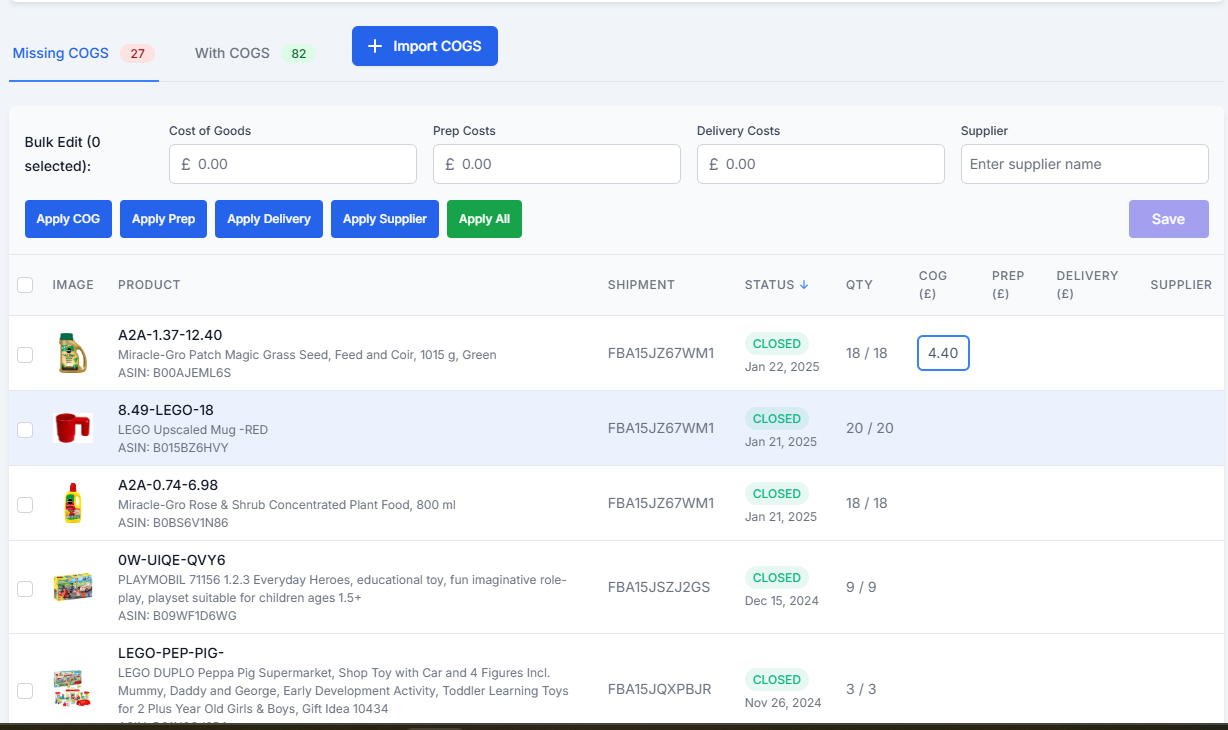
As you can see from the screenshot, the days of Excel spreadsheets and manual entry are gone. Well actually, you can still do manual import from this sheet, but it adds immediately, as soon as you hit save. No messing around with file extensions.
You can add Cogs, Prep & Delivery Costs and your Supplier name also. In addition to this, you can also tick the bulk option and complete the COGs for many all at once.
They have made it really easy to onboard also. For example, I am a member of STK at the moment, as an affiliate I have to stay up to date with the latest changes etc. What Sellerfuse does great here, is they allow for the auto import of COGs straight from other providers.
I exported my COGs from STK. I pressed Import in Sellerfuse. I uploaded the file. It added all of them. It really was as simple as that.
Sellerfuse makes Cost of Goods easy.
Amazon Orders Overview
Your orders page will be the page you visit most often. It does what it says on the tin, shows all of your orders. There’s nothing special to this, but it’s pretty well designed and all of the sales information is there for you to see. They show all fee calculations too, which is nice.
FBA Sales Monitoring / Overview Tool
The sales overview page provides you with a summary of all of your orders, which is very handy for viewing summaries such as This Month, Last Month and other time periods. The data is provided per SKU, so you can see the best selling items that you sell.
Amazon Shipment Management Tracker
The Amazon FBA Shipment Manager is a fantastic little addition. Other software I’ve used in the past shows you the ASINs and whether the item has been delivered. But Sellerfuse does even more. In addition to seeing the basic data, you’ll see a financials tab. When you click this, it takes a deep dive into the product data.
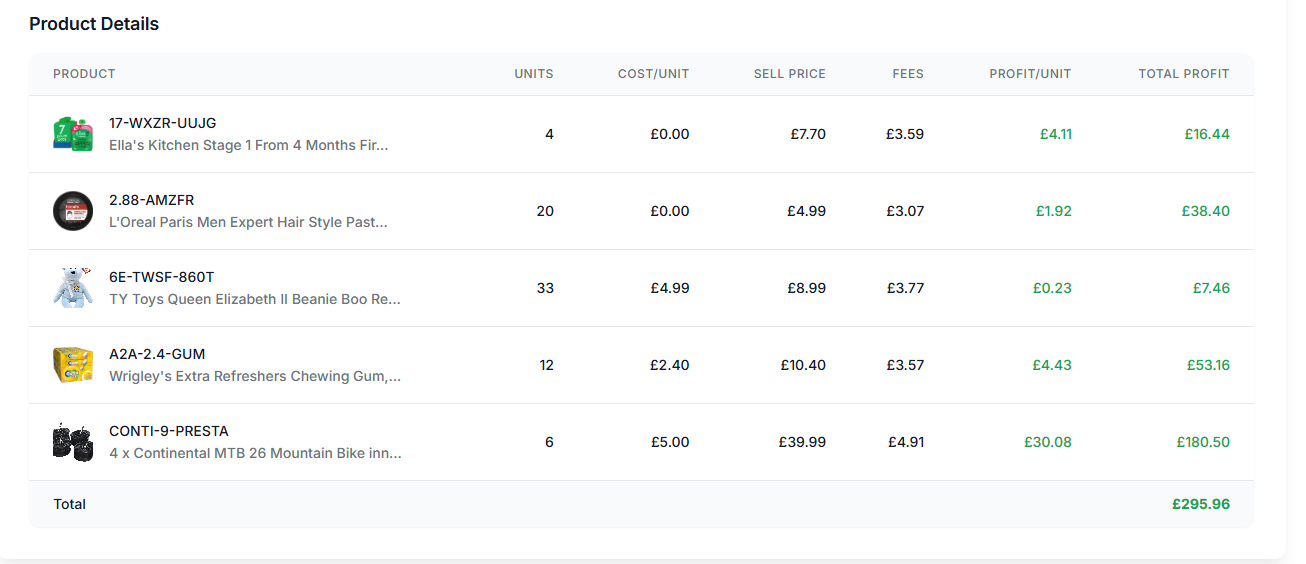
This goes into deeper level of analysis, showing estimated profit for each item, then a combined total profit per shipment. To do this, it calculates the fees and selling price which gives us an accurate profit figure.
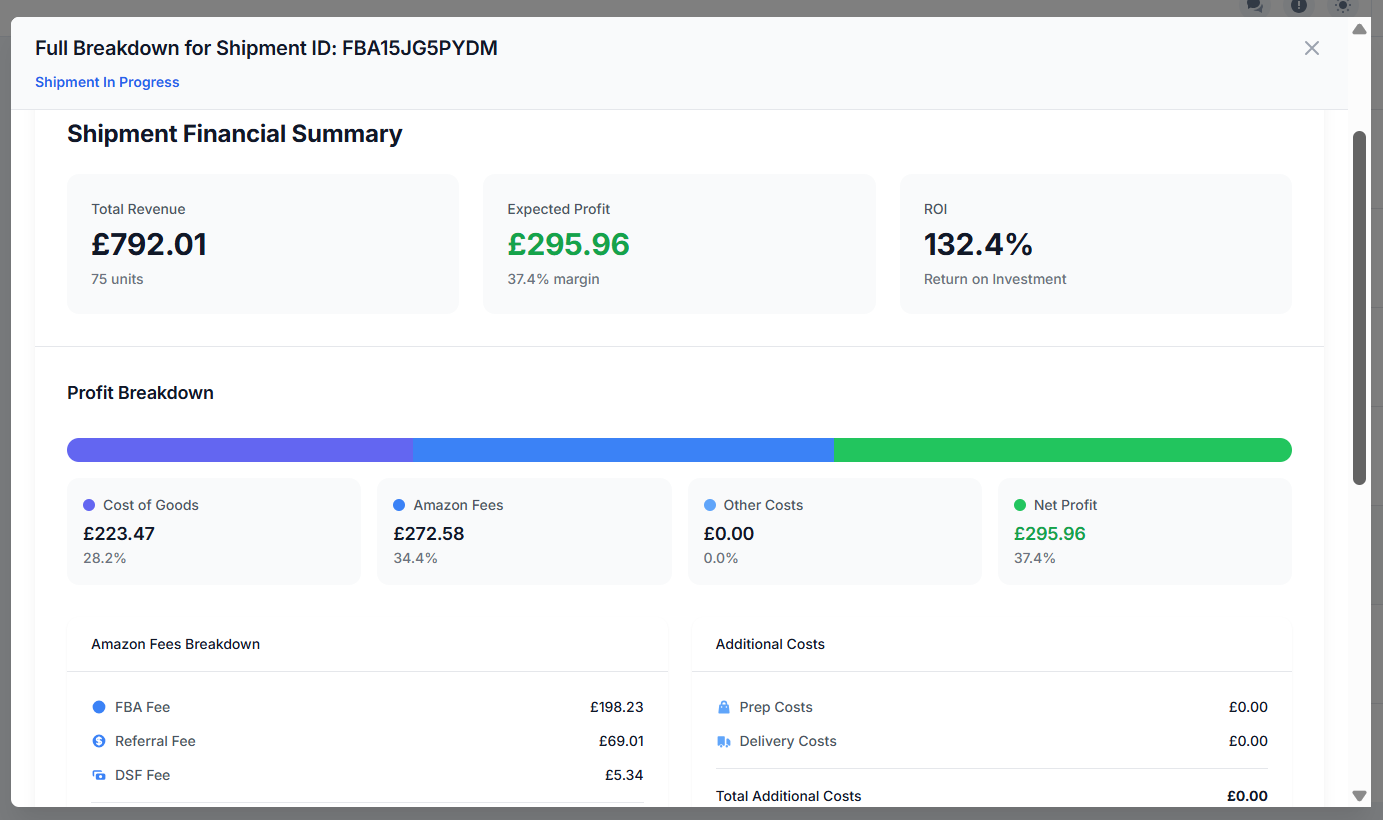
I really like this, it helps you to see the true value of your shipments, not just the amount of stock you’ve sent in to Amazon.
FBA Feedback Monitor
Amazon FBA Competition Tracker
FBA Buy Box Tracker
Amazon FBA Account Health Monitoring Tool
Check if your are Gated on Amazon
I’ve lost count of the amount of times that I’ve purchased something from a Discord group, and then by the time it’s arrived and I’ve prepped it, I’ve found that it’s actually a HazMat item, or worse, I can’t sell the item at all!
This happened recently with a Price Error I purchased, some Electrolyte Gels. I can’t complain, they were extremely cheap and I still managed to sell them on eBay. Well, all but 2, I have some left over in the garage!
What I really like about the Gated Checker, is that if I don’t have time to check during the order process, as many of you won’t, we can quickly ping it in here too.
It’s a great pre-sourcing tool. We know with Discord Pings, the rule is buy now, analyse later.
Free Amazon FBA Fee Calculator
Amazon FBA Sourcing Software
I’ve seen some good spreadsheets around, but this software for Sourcing absolutely changes the game for me. It has turned Sellerfuse into a one-stop shop for me, I can login here and do absolutely everything I need. Spreadsheets are good, but they are often tied to a single PC, unless you use the cloud, but they just aren’t as powerful or easy to use.
The Sourcing Software deals with everything pre-Amazon, literally everything. From finding your suppliers, to having you upload your invoices for safe-keeping, or your stock which is out for delivery or at your prep center.
- Track your supplier contact info
- Track Items that you’ve sourced & their expected profitability
- Control Your Spend with Budgets & Goals
- Monitor Purchase Orders & Ensure Safe Delivery of all products
- Track Items to Home Addresses, Prep Centers
What I absolutely love, is the budgeting side of things. I like to set a £5,000 monthly budget, and this adjusts to advise me exactly how much I need to spend, to hit my goals.
This is in testing at the moment, and we have been advised that there is much more to come, which is one of the main reasons we are excited for these developments.
Storefront Stalker Bot
For a few months, I’ve been paying £50 for a storefront stalker. You can’t put a price on profitable products, and getting the information fast is a sure-fire way to stay ahead of the game. In 2025, Sellerfuse released the FBA Storefront Stalker bot, and it’s included in the seller membership fees.
For those not completely aware of what a Storefront Stalker does, let me explain.
If you know a specific seller on Amazon that finds good, profitable products, you may consistently check their storefront to check for new ASINS.
The old way of doing this is by spreadsheet, and manually updating your files to document new ASINs. This is before you’ve even worked out if they’re profitable.
You can offload all of your work here, and Sellerfuse will document these new products that your competitors have added. You’ll get an instant notification, and also an email notification, of the new ASIN that’s added.
One step further, they manage to get the fee information, and then proceed to tell you what you need to pay for it, to get X amount of profit. This is honestly a super tool.
I think I love it mostly for the fact that I’ve saved £600 a year from other subscriptions.
eBay Seller Toolkit
Task Board & Calendar
Amazon Reconciliation Software – Main Hub
Amazon FBA Returns Data
Reimbursements Software for Non Returned Items
Other Tools:
Ticket Reselling